Scripting
NXSL
Overview
In many parts of the system, fine tuning can be done by using NetXMS built-in scripting language called NXSL (stands for NetXMS Scripting Language). NXSL was designed specifically to be used as embedded scripting language within NetXMS, and because of this has some specific features and limitations. Most notable is very limited access to data outside script boundaries - for example, from NXSL script you cannot access files on server, nor call external programs, nor even access data of the node object other than script is running for without explicit permission. NXSL is interpreted language - scripts first compiled into internal representation (similar to byte code in Java), which is then executed inside NXSL Virtual Machine. Language syntax and available functions can be found in NXSL documentation.
List of places where NXSL scripting is used
Script library
DCI transformation scripts
DCI instance filter script
DCI scripted threshold
DCI summary table object filter script
Container, template, cluster auto-bind script
SNMP trap transformation script
EPP filter script
EPP inline script actions
Map object filter script
Map link styling script
Dashboard scripted chart
Dashboard status indicator
Context dashboard auto-bind script
Business service scripted check
Business service DCI auto apply script
Business service object auto apply script
Business service prototype instance filter script
Asset attribute auto fill script
Object query
Agent configuration filter script
Condition status calculation script
Custom housekeeping scripts (see Custom housekeeping scripts)
Write access restrictions
Added in version 6.2.
Scripts that the server evaluates on its own — transformation, filter, predicate,
and analysis scripts — run with a read-only security context and cannot change
anything in the system. This is controlled by the server configuration parameter
Scripts.RestrictWriteAccess, which is enabled by default both on new
installations and after an upgrade from an earlier version.
Such scripts are allowed to read object properties, alarms, agent data, and SNMP data. Every other operation is denied, including:
object modification methods, such as
setCustomAttribute(),deleteCustomAttribute(),setComments(),setAlias(),rename(),manage(),unmanage(),enterMaintenance(),leaveMaintenance(),bind(),unbind(),createNode(),createContainer(),setGeoLocation(),setExpectedState(), and theenable*()family;active operations on nodes, such as
executeAgentCommand(),executeSSHCommand(),openSSHSession(),wakeUp(), and forced polls;functions that require system access rights, such as
PostEvent(),PostEventEx(),SendNotification(),SendMail(),GetConfigurationVariable(),LoadEvent(),CreateUserAgentNotification(), andCancelScheduledTasksByKey().
Warning
A denied operation does not raise a script error. The call simply returns
false (or a null value, or the supplied default value in case of
GetConfigurationVariable()), the script continues, and nothing is written
to the server log at default logging levels. The only trace is a message
produced by the debug tag nxsl.security at level 7. If a script that
worked before an upgrade to 6.2 silently stopped having any effect, this is
the first thing to check. Scripts started by a user are denied the same
silent way when the user lacks the required access rights, see
Scripts started by a user.
The following scripts are restricted:
DCI transformation script (both single-value and table DCIs)
DCI scripted threshold
DCI with Script origin
script:macro in DCI text expansion and%[script]macro in object text expansionContainer, collector, template, and cluster auto-bind and auto-apply filter scripts
Condition status calculation script
Business service scripted check
Business service prototype instance discovery script and instance filter script
EPP filter script
Root cause analysis script (both when an alarm is created by EPP and during background re-evaluation)
Asset attribute auto fill script
Map object filter script, map link styling script, and map link color provider script
SNMP trap transformation script
The following scripts are not restricted and can still modify objects even when
Scripts.RestrictWriteAccess is enabled:
EPP action of type Execute NXSL script
Hook scripts (script library entries named
Hook::*)Scripts executed by scheduled tasks, limited by the access rights of the task owner (see Scripts started by a user)
Object tools of type Server Script, limited by the access rights of the user who runs the tool (see Scripts started by a user)
Scripts executed manually from the Execute Server Script view, limited by the access rights of the user who runs the script (see Scripts started by a user)
Scripts executed with the
execcommand of the server debug consoleDCI instance discovery filter script
If a restricted script has to modify objects, the recommended approach is to move the modifying part into one of the unrestricted script types listed above — for example, have the DCI generate an event and perform the modification from an EPP Execute NXSL script action.
Alternatively, the restriction can be turned off completely by setting
Scripts.RestrictWriteAccess to false in . The change takes effect immediately, without a server
restart. Note that changing the value directly in the config database table
bypasses the change notification and does require a server restart.
Note
If the Scripts.RestrictWriteAccess row is missing from the configuration
altogether, the server treats the restriction as enabled.
Scripts started by a user
Added in version 6.1.
Scripts started by a user run with that user’s security context, regardless of
the Scripts.RestrictWriteAccess setting. This applies to:
object tools of type Server Script;
scripts executed from the Execute Server Script view;
dashboard scripted chart elements;
scripts executed by scheduled tasks, with the security context of the task owner. Tasks created by the server itself run as the built-in
systemuser, which has all access rights;script library scripts that the AI assistant calls as tools, with the security context of the user of the chat session.
Library scripts called from such a script run in the same context.
Changed in version 6.2.6: Scripts executed by scheduled tasks and AI assistant tool scripts run with a user security context. In earlier versions they are not restricted.
Such a script can access or modify an object only if the user has the access
right that the operation requires on that object. For example,
setCustomAttribute() requires the Modify access right on the
object. Functions that require system access rights, such as
SendNotification() or GetConfigurationVariable(), are allowed only if
the user has the corresponding system access right.
Warning
A call denied by the user’s security context behaves the same way as one
denied by the read-only context: it returns false (or a null value, or
the supplied default value in case of GetConfigurationVariable()), no
script error is raised, and the script continues. Object access denials are
logged by the debug tag nxsl.security at level 4. Denials of system
access rights are not logged at all.
Scripting library
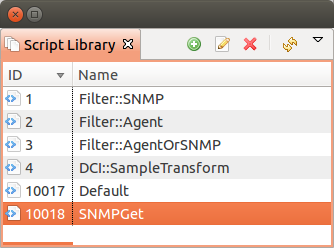
Script Library is used to store scripts that can be afterwards executed as macros, part of other script or from debug server console. Scripts can be added, deleted and modified in in this view.
Usage
- Scripts from Script Library can be accessed as:
a macros %[scriptName]
used in action of type “Execute NXSL script”
executed from DCIs with “Script” source
functions can be called from other scripts either by using “import scriptName“ and calling functions by name, or without import, by calling “scriptName::functionName“
executed from server debug console “execute scriptName“
scripts having name starting with “Hook::“ are executed automatically, e.g. “Hook::ConfigurationPoll” is being run on each node’s configuration poll
Note
All parameters provided to script are accessible via $ARGS array. The other option to use parameters is to specify main() function in the script and define parameters in it’s definition.
Execute Server Script
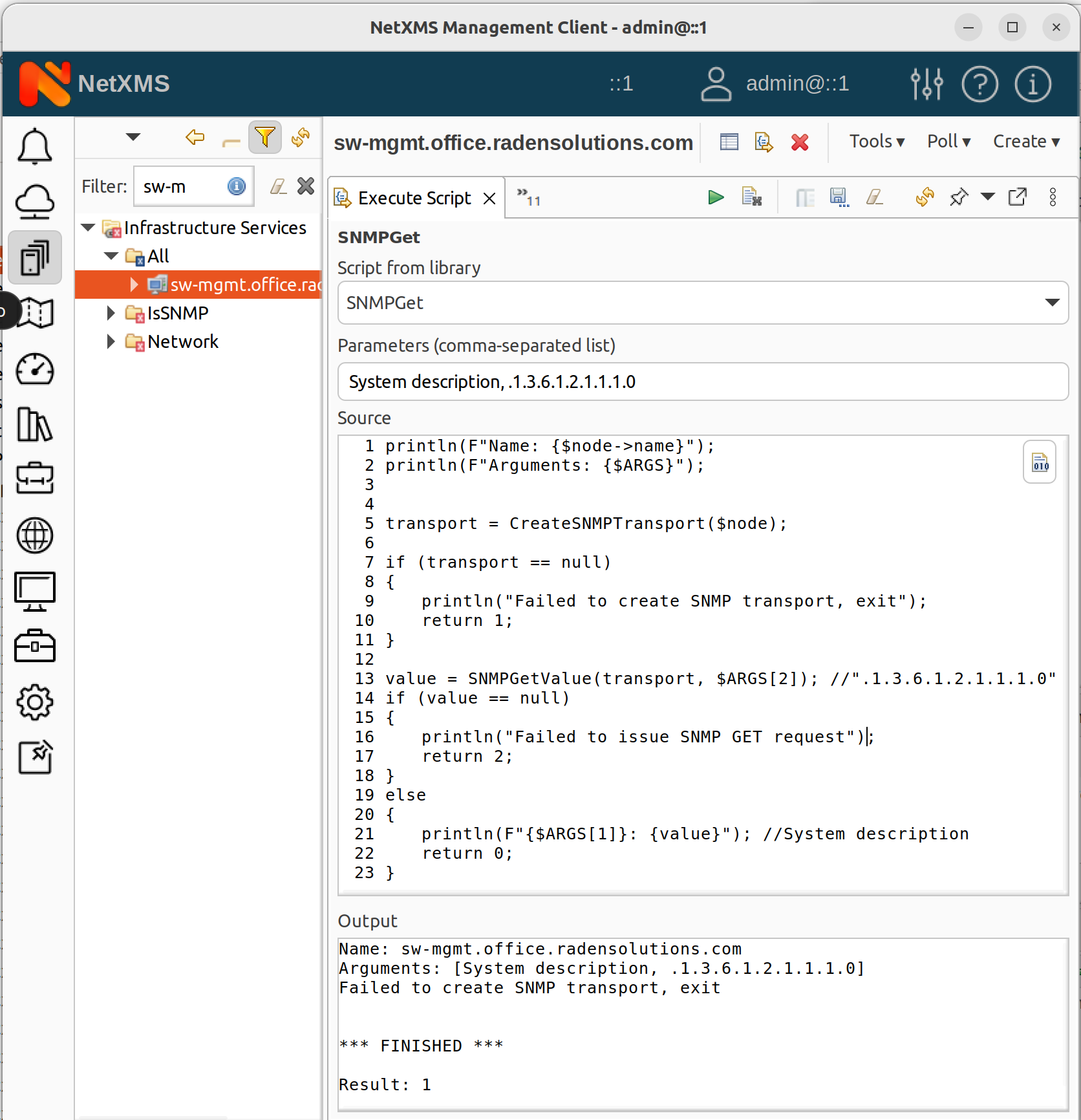
This view allows to execute arbitrary script. Script can be manually created just before execution,
and saved afterwards, can be taken from the script library or modified script can be used from the
script library and saved or saved as afterwards. If this view is opened on a node, then in the
script $node variable is available with node object.
All parameters provided to script, like $node, $object, $isCluster, $ARGV, etc, are accessible via $ARGS array. Please refer to NXSL Guide for more information.
NXShell
NXShell is based on Jython and provide access to NetXMS Java API using interactive shell. NXShell binary comes with server distribution suite and can be run from shell or crontab. NXShell is also build as single jar file, which includes all required libraries.
Download: http://www.netxms.org/download/nxshell-VERSION.jar (example: http://www.netxms.org/download/nxshell-5.0.8.jar)
Usage
NXShell binary gets installed in $NETXMS_HOME directory, for example /usr/bin/nxshell. As of version 5.1, nxshell launcher accepts command line -r or –properties= for providing path to nxshell properties file.
Usage: nxshell [OPTIONS] [script]
- Options:
- -C, --classpath <path>
Additional Java class path.
- -D, --debug
Show additional debug output (use twice for extra output).
- -h, --help
Display this help message.
- -H, --host <hostname>
Specify host name or IP address. Could be in host:port form.
- -j, --jre <path>
Specify JRE location.
- -n, --no-sync
Do not synchronize objects on connect.
- -p, --port <port>
Specify TCP port for connection. Default is 4701.
- -P, --password <password>
Specify user’s password. Default is empty.
- -r, --properties <file>
File with additional Java properties.
- -t, --token <token>
Login to server using given authentication token.
- -u, --user <user>
Login to server as user. Default is “admin”.
- -v, --version
Display version information.
There are two options of this jar usage:
it can be started as interactive shell:
java -jar nxshell-5.0.8.jar
it can be started with the script name as a first parameter. Then it will just execute this script and exit. Example:
java -jar nxshell-5.0.8.jar test.py
When NXShell is started, it tries to get server IP, login and password from Java properties. In interactive mode, user will be asked for details, otherwise default values will be used.
Start as interactive shell, with IP and Login provided (password will be asked):
java -Dnetxms.server=127.0.0.1 -Dnetxms.login=admin -jar nxshell-5.0.8.jar
Properties
These properties should be set with JVM’s “-D” option. Please make sure that all “-D” options are before “-jar”.
Parameter |
Default Value |
|---|---|
netxms.server |
127.0.0.1 |
netxms.login |
admin |
netxms.password |
netxms |
netxms.encryptSession |
true |
Scripting
For details on API please refer to javadoc at http://www.netxms.org/documentation/javadoc/latest/.
NXShell provide user with already connected and synchronized session to simplify scripting. Most required packages are imported as well to minimize typing.
Global Variables
Variable |
Type |
Notes |
|---|---|---|
session |
org.netxms.client.NXCSession |
|
s |
org.netxms.client.NXCSession |
Alias for “session” |
Helper Functions
Example
More examples can be found on a NetXMS wiki.
parentId = objects.GenericObject.SERVICEROOT # Infrastructure Services root
cd = NXCObjectCreationData(objects.GenericObject.OBJECT_CONTAINER, "Sample Container", parentId);
containerId = session.createObject(cd) # createObject return ID of newly created object
print '"Sample Container" created, id=%d' % (containerId, )

flags = NXCObjectCreationData.CF_DISABLE_ICMP | \
        NXCObjectCreationData.CF_DISABLE_NXCP | \
        NXCObjectCreationData.CF_DISABLE_SNMP
for i in xrange(0, 5):
    name = "Node %d" % (i + 1, )
    cd = NXCObjectCreationData(objects.GenericObject.OBJECT_NODE, name, containerId);
    cd.setCreationFlags(flags);
    cd.setPrimaryName("0.0.0.0") # Create node without IP address
    nodeId = session.createObject(cd)
    print '"%s" created, id=%d' % (name, nodeId)